Your Data Layer Is Correct, but Is the Hit Actually Arriving Right in GA4, Meta, and Segment?
- Published
- 8 min read
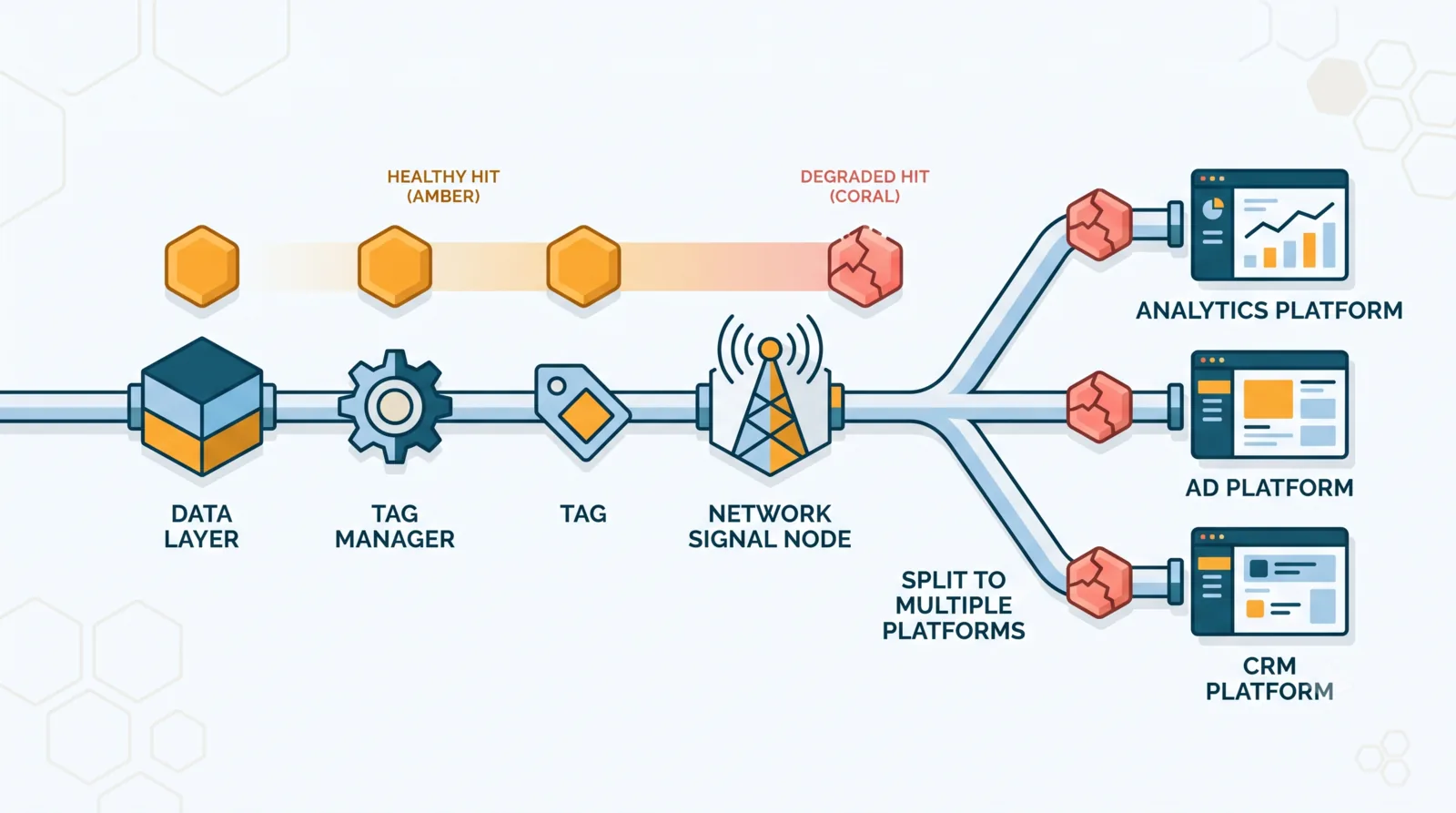
In short: a correct data layer doesn't guarantee a correct hit. The hit is the request actually sent to GA4, Meta, or Segment, and it can degrade in transit: consent mode, GTM mapping, a truncated parameter, a hit that never fires. The safest way to check is the browser Network tab, which shows the raw request leaving toward each platform, then GA4 DebugView, Meta Test Events, and the Segment debugger confirm arrival.
You've QA'd your data layer. Every event fires, the variables are there, the values are right. On paper, it's spotless. And yet GA4 undercounts your conversions, Meta disagrees with GA4, and your CDP shows something else again. How is that possible if the data layer is correct?
Because the data layer is only the starting point. Between it and your reports lies a journey, and every stage can damage the data. Checking the data layer is necessary. Checking that the hit arrives right at its destination is the level above, and it's the one almost nobody controls. Let me walk you through it.
Why a correct data layer isn't enough
Here's the idea to internalize: a correct data layer doesn't automatically produce correct data in your tools. The data layer is the first piece of a chain, not the last.
A simple image: the data layer is the perfectly packed parcel. The hit is the delivery. You can obsess over the packaging, but if the truck goes to the wrong address, truncates the contents, or never leaves, the parcel doesn't arrive. And nobody at the depot warns you.
That's exactly what happens with tracking: you QA the data layer, you feel reassured, and you never go check what actually lands in GA4, Meta, or Segment. That's the gap.
What is a hit, and what journey does it take?
As a reminder, a hit is the request sent to an analytics or media platform: a page view, an event, a conversion. It's the concrete translation of your data layer into a network call that GA4 or Meta will receive.
Between the data layer and the final report, the journey looks like this:
- A
pushlands in the data layer. - GTM reads it and populates its variables.
- A tag builds the hit from those variables.
- The browser (or the server, in server-side) sends the network request.
- The platform ingests the hit.
- The data shows up (or doesn't) in your reports.
At every stage, the data is transformed. So the final hit can differ from the original data layer. That's where everything is decided.
Where a hit breaks in transit
Here are the breaking points I run into most often, with a flawless data layer in hand:
- Consent mode. Without consent, GA4 switches to modeled "cookieless" hits, and some media platforms simply receive nothing. Your data layer is fine, but the hit is blocked or degraded upstream.
- GTM mapping. The variable exists in the data layer, but it isn't mapped in the tag. As a result, the parameter goes to GA4 empty, even though the data was there to begin with.
- The truncated parameter. GA4 enforces length limits on names and values. An overlong
item_nameor event name gets cut, and your reports show clipped data. - The hit that never fires. The tag's trigger is misconfigured: the data layer fires, but no hit follows. The event exists on the site, it exists nowhere on the platform.
- The client/server duplicate. The same event is sent browser-side and server-side with no deduplication id (
event_id). Meta counts it twice. - The misconfigured server-side. A transport URL, headers, or first-party cookies set up wrong, and a share of hits gets lost in transit with no signal at all.
The common thread? The data layer passes QA with flying colors. The problem is elsewhere, further down the journey.
How to check that a hit arrives right, platform by platform
There are two levels of verification, and the first is by far the safest: seeing what actually leaves the browser. Only then do you confirm what each platform receives.

The Network tab, the most reliable check
If there's one method to remember, it's this one. Open the developer console, go to the Network tab, and watch the requests that actually leave the page. This is the source of truth: you see the raw hit, with all its parameters, as it leaves the browser, before any interpretation by a third-party interface.
Concretely, you filter by platform:
- GA4: requests to
/g/collect. The event name is in theenparameter, event parameters are prefixedep.(text) orepn.(number). - Meta: requests to
/tr. The event name is inev, custom data in thecd[...]parameters. - Segment: requests to
api.segment.io. The detail of thetrackorpagecall is in the request payload (body).
Why is it the safest method? Because it doesn't depend on any debug mode being enabled, on any interface that might filter or reformat the data. You see what leaves, with which parameters, and toward which platform, full stop. If the event is right in the Network tab and heading to the right destination, you're certain the departure is clean. It's the check I run first, every time.
GA4: confirm arrival
Once departure is validated in the Network tab, GA4's DebugView (with debug_mode enabled) shows the event as GA4 receives and interprets it, parameter by parameter. If the hit leaves fine but doesn't appear in DebugView, you know the problem is on the ingestion side, not the sending side. The diagnosis is immediate.
Meta: confirm arrival and deduplication
Head to the Events Manager, Test Events tab, with the provided test code. You'll see pixel and Conversions API (CAPI) events arrive in real time. It's also where you check deduplication between the browser hit and the server hit via the event_id. The Meta Pixel Helper rounds out the browser-side diagnosis. For the full method on Meta specifically — match quality, deduplication rate and the eight-event optimization limit — see how to check whether your Meta Pixel is working.
Segment: confirm arrival in the CDP
Segment's Source Debugger shows the incoming track, identify, and page calls live, with their properties. It's the place to confirm the event reaches the CDP with the right name and the right properties, before it's even redistributed to destinations.
Why GA4, Meta, and Segment diverge on the same events
"My numbers don't match between GA4 and Meta, which one is right?" The question comes up constantly. The truth is the three platforms don't measure the same way:
- Consent is handled differently from one platform to the next.
- Deduplication doesn't follow the same rules.
- Ad blockers hit the Meta pixel harder than GA4.
- Attribution windows and event definitions aren't identical.
Keep in mind that a gap between platforms isn't necessarily a bug: sometimes it's structural. On the other hand, a sudden gap, or a huge gap on a specific event, is almost always the sign of a hit degrading somewhere. The nuance matters.
QA your hits continuously, not just the data layer
You'll have understood by now: QA-ing hits is a notch more demanding than QA-ing the data layer. It's no longer enough to look at GTM Preview; you have to go and check, in each platform, that the data arrived and arrived well formed.
Done by hand, it's a considerable amount of work: opening the Network tab for every journey, then cross-checking with GA4 DebugView, Meta Test Events, and the Segment debugger, on every release. Suffice to say nobody does it continuously.
That's exactly the direction MayIA° takes: rather than relying on an interface, it inspects the sent hits directly, the way you would in the Network tab, but automatically and continuously, across every journey and on every release. It checks that each event leaves for the right platform, with the right parameters, all the way into GA4, Meta, and the CDP. The data layer is correct, but is the hit actually arriving right? That's the final stretch of tracking to secure.
Wrapping up
If there's one thing to take away: a correct data layer is only half the road. The data can still get lost, truncated, or duplicated between the push and the final report. Until you've checked the hit at its destination, you don't know your data is reliable, you hope it is.
The right reflex: after QA-ing the data layer, go confirm the real arrival of the hits in each platform, starting with the Network tab. It's tedious, but that's where the gaps that skew your decisions hide.
Your numbers diverge across platforms and you want to know where the data is lost? Reach out to the MayIA° team, we'll look at it together. And if you'd rather have hands-on human support to dig into it, the Smart Bees experts can take over.
FAQ
How do I know if my GA4 hit is actually sent?
Cross two checks. The browser Network tab, filtered on /g/collect requests, shows the hit that really leaves with its parameters. GA4 DebugView shows the event as GA4 receives it. If the hit leaves but doesn't appear in GA4, the problem is on ingestion, not sending.
Why do my numbers differ between GA4 and Meta?
Because the two platforms handle consent, deduplication, ad blockers, and attribution windows differently. A structural gap is normal; a sudden or disproportionate gap on a specific event often signals a hit degrading somewhere.
Can a correct data layer still produce bad data?
Yes, and that's the whole point. The data layer is only the start of the chain. An incomplete GTM mapping, a restrictive consent mode, a truncated parameter, or a tag that doesn't fire can degrade the hit even with a perfect data layer.
How do you test hits server-side?
The Server-Side GTM container has its own Preview mode showing incoming requests and outgoing hits to each platform. On Meta, Test Events confirm receipt of the CAPI hit. The point is to verify the data sent server-side with no loss and no duplicate against the browser hit.
Can consent mode block my hits?
Yes. Depending on the user's consent choice, some hits don't fire or fire in a modeled, degraded form. It's intended for compliance, but misconfigured it can make conversions disappear. Checking hits under granted and denied consent is part of serious QA.